In this section you will find common issues that you may face when setting up your Beans iD embedded landing page. Alongside this, you will also find instructions on how to use the debugging tool contained within our <script> to help with diagnosing and fixing issues.
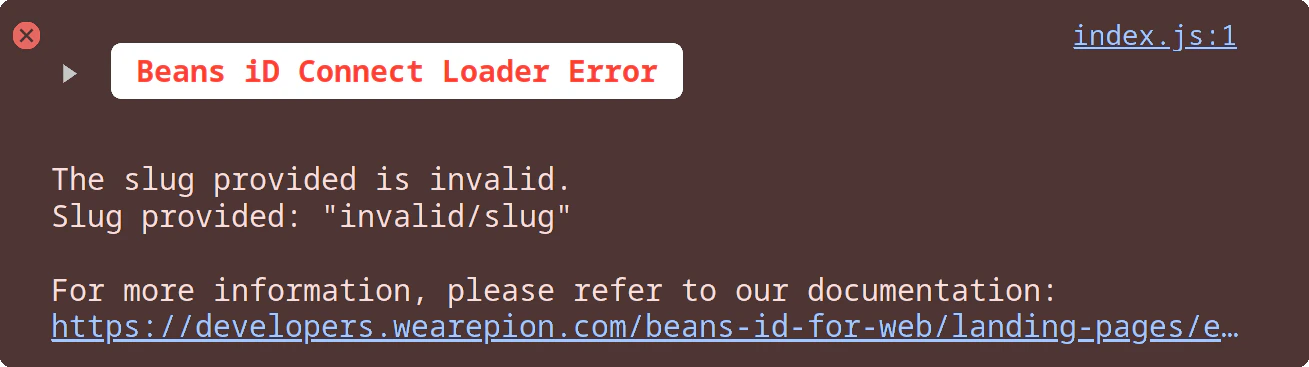
Our <script> is able to diagnose common issues that may occur when implementing our script. For this functionality to work the <script> must be loaded into the page.Once loaded into the page, the <script> will try to embed your landing page, but if it is unable to do so it will attempt log an error into your browser console. This error will inform you of what went wrong, and will provide a link to one of the issues listed below to help you get the issues resolved.To access these error messages simply open the developer console in your browser using ctrl + shift + j on Windows, or cmd + shift + j on Mac. If the <script> was able to identify any issues you will be able to find a message similar to the one below, detailing the issue and linking to our documentation which will detail a fix.
Below are listed some common issues you may face when implementing your embedded landing page. Some of these issues will be automatically detected by the debugging tool referenced above which can help to make it easier to understand which issue you may be facing.
We still support a legacy implementation of the script that has much more limited error reporting. The two errors that can be raised by the legacy implementation are listed below.
Missing data-connect attribute
Invalid data-connect attribute
If you are seeing legacy issues then you are using an outdated implementation.We strongly recommend upgrading to our most current implementation documented here. (landing pages link)
Was this page helpful?
{"docsConfig":{"theme":"mint","$schema":"https://mintlify.com/docs.json","name":"Pion","description":"Growth is simple when you can verify, own and reach audiences in one place.","colors":{"primary":"#000000","light":"#d9ff00","dark":"#000000"},"logo":{"light":"https://mintcdn.com/pion/RNadOR73X-3Y7Qi-/logo/light.svg?fit=max\u0026auto=format\u0026n=RNadOR73X-3Y7Qi-\u0026q=85\u0026s=585aeffbd402a2497785e78000ffec4f","dark":"https://mintcdn.com/pion/RNadOR73X-3Y7Qi-/logo/dark.svg?fit=max\u0026auto=format\u0026n=RNadOR73X-3Y7Qi-\u0026q=85\u0026s=06505e0f822df278623a66a0dce032f3","href":"https://www.wearepion.com"},"favicon":{"light":"https://mintcdn.com/pion/sC1ZNcmPaE6PWgth/images/pionfav.png?fit=max\u0026auto=format\u0026n=sC1ZNcmPaE6PWgth\u0026q=85\u0026s=24104e70b6027a27c388c1367316e5ce","dark":"https://mintcdn.com/pion/sC1ZNcmPaE6PWgth/images/pionfav-light.png?fit=max\u0026auto=format\u0026n=sC1ZNcmPaE6PWgth\u0026q=85\u0026s=ad6f33f728b45224c3764033c03b2836"},"api":{"openapi":"api-reference/openapi-v1.json","playground":{"display":"none"}},"background":{},"navbar":{"links":[{"href":"mailto:hi@mintlify.com","label":"Support"}],"primary":{"type":"button","label":"Dashboard","href":"https://dashboard.mintlify.com"}},"footer":{"socials":{"linkedin":"https://www.linkedin.com/company/wearepionglobal","x":"https://x.com/wearepion"}},"contextual":{"options":["copy","view","chatgpt","claude","perplexity","mcp","cursor","vscode"],"display":"header"},"styling":{"latex":false},"navigation":{"pages":[]}},"deployment":{"deploymentMetadataValue":{"subdomain":"pion","hasAudioNarration":false,"actualSubdomain":"pion","customDomains":["docs.wearepion.com"],"gitSource":{"type":"github","owner":"thebeansgroup","repo":"mintlify-documentation","deployBranch":"main","contentDirectory":"","isPrivate":true,"mountPath":"","label":""},"chroma":{"liveDeploymentHistoryId":"6aba3ba6b873ba1b86962ac2","collectionId":"c28f2b42-c3a6-4397-9709-483b891168e7","schemaVersion":"v3","latestBuiltDeploymentHistoryId":"6aba3ba6b873ba1b86962ac2"},"feedback":{"thumbs":true},"entitlements":{},"buildId":"6aba3ba6b873ba1b86962ac2","clientVersion":"0.0.3939","searchFilterCounts":[{"language":"default","tag":"Documentation","count":46},{"language":"default","tag":"Verify your Customers","count":37},{"language":"default","tag":"Landing Pages","count":23},{"language":"default","tag":"Web","count":18},{"language":"default","tag":"Beans iD Whitelabel API","count":17},{"language":"default","tag":"Embedded Landing Pages","count":14},{"language":"default","tag":"API Reference","count":13},{"language":"default","tag":"Troubleshooting","count":8},{"language":"default","tag":"Student Beans SSO","count":6},{"language":"default","tag":"App","count":4}]},"assistantConfig":{"enableAskAiButton":false,"enableStarterQuestions":false,"enableAskAiSearchBar":true},"hasChatPermissions":false,"hasWebMcpPermissions":false,"toggles":[{"name":"kill-isr","enabled":true,"variant":{"name":"disabled","enabled":false,"feature_enabled":true},"impressionData":false},{"name":"agent-mintlify-slack","enabled":true,"variant":{"name":"disabled","enabled":false,"feature_enabled":true},"impressionData":false},{"name":"editor-v7-file-tree","enabled":true,"variant":{"name":"disabled","enabled":false,"feature_enabled":true},"impressionData":false},{"name":"agent-integrations-settings","enabled":true,"variant":{"name":"disabled","enabled":false,"feature_enabled":true},"impressionData":false},{"name":"automations-pr-grouping","enabled":true,"variant":{"name":"disabled","enabled":false,"feature_enabled":true},"impressionData":false},{"name":"custom-prefix","enabled":true,"variant":{"name":"disabled","enabled":false,"feature_enabled":true},"impressionData":false},{"name":"analytics-v7","enabled":true,"variant":{"name":"disabled","enabled":false,"feature_enabled":true},"impressionData":false},{"name":"user-flows-analytics","enabled":true,"variant":{"name":"disabled","enabled":false,"feature_enabled":true},"impressionData":false},{"name":"no-publish-flow","enabled":true,"variant":{"name":"disabled","enabled":false,"feature_enabled":true},"impressionData":false},{"name":"workos-onboarding","enabled":true,"variant":{"name":"disabled","enabled":false,"feature_enabled":true},"impressionData":false},{"name":"llms-txt-v2","enabled":true,"variant":{"name":"disabled","enabled":false,"feature_enabled":true},"impressionData":false},{"name":"pause-universal-search-reconcile","enabled":true,"variant":{"name":"disabled","enabled":false,"feature_enabled":true},"impressionData":false},{"name":"snapshot-serving-live","enabled":true,"variant":{"name":"disabled","enabled":false,"feature_enabled":true},"impressionData":false},{"name":"stripTemperatureMiddleware","enabled":true,"variant":{"name":"disabled","enabled":false,"feature_enabled":true},"impressionData":false},{"name":"per-site-search-delta","enabled":true,"variant":{"name":"disabled","enabled":false,"feature_enabled":true},"impressionData":false},{"name":"support-platform-pylon-zendesk","enabled":true,"variant":{"name":"disabled","enabled":false,"feature_enabled":true},"impressionData":false},{"name":"snapshot-serving","enabled":true,"variant":{"name":"disabled","enabled":false,"feature_enabled":true},"impressionData":false},{"name":"instant-rollback","enabled":true,"variant":{"name":"disabled","enabled":false,"feature_enabled":true},"impressionData":false},{"name":"granular-notifications-server","enabled":true,"variant":{"name":"disabled","enabled":false,"feature_enabled":true},"impressionData":false},{"name":"granular-notifications","enabled":true,"variant":{"name":"disabled","enabled":false,"feature_enabled":true},"impressionData":false},{"name":"editor-private-page-search","enabled":true,"variant":{"name":"disabled","enabled":false,"feature_enabled":true},"impressionData":false},{"name":"automations-fable","enabled":true,"variant":{"name":"disabled","enabled":false,"feature_enabled":true},"impressionData":false},{"name":"fixed-ai-action-pricing","enabled":true,"variant":{"name":"disabled","enabled":false,"feature_enabled":true},"impressionData":false},{"name":"automation-resolve-merge-conflict","enabled":true,"variant":{"name":"disabled","enabled":false,"feature_enabled":true},"impressionData":false},{"name":"scoped-publishing","enabled":true,"variant":{"name":"disabled","enabled":false,"feature_enabled":true},"impressionData":false},{"name":"mintql","enabled":true,"variant":{"name":"disabled","enabled":false,"feature_enabled":true},"impressionData":false},{"name":"page-level-analytics","enabled":true,"variant":{"name":"disabled","enabled":false,"feature_enabled":true},"impressionData":false},{"name":"editor-version-history-v2","enabled":true,"variant":{"name":"disabled","enabled":false,"feature_enabled":true},"impressionData":false},{"name":"editor-nav-generations","enabled":true,"variant":{"name":"disabled","enabled":false,"feature_enabled":true},"impressionData":false},{"name":"billing-page-v2","enabled":true,"variant":{"name":"disabled","enabled":false,"feature_enabled":true},"impressionData":false},{"name":"workspace-projects","enabled":true,"variant":{"name":"disabled","enabled":false,"feature_enabled":true},"impressionData":false},{"name":"assistant-v5","enabled":true,"variant":{"name":"disabled","enabled":false,"feature_enabled":true},"impressionData":false},{"name":"byok-sep-25","enabled":true,"variant":{"name":"disabled","enabled":false,"feature_enabled":true},"impressionData":false},{"name":"fork-pr-previews","enabled":true,"variant":{"name":"disabled","enabled":false,"feature_enabled":true},"impressionData":false},{"name":"revalidation-jwt","enabled":true,"variant":{"name":"disabled","enabled":false,"feature_enabled":true},"impressionData":false},{"name":"vite-origin","enabled":true,"variant":{"name":"disabled","enabled":false,"feature_enabled":true},"impressionData":false},{"name":"editor-agent-model-picker","enabled":true,"variant":{"name":"disabled","enabled":false,"feature_enabled":true},"impressionData":false},{"name":"billing-updated-9-15","enabled":true,"variant":{"name":"disabled","enabled":false,"feature_enabled":true},"impressionData":false},{"name":"hobby-abuse-scan","enabled":true,"variant":{"name":"disabled","enabled":false,"feature_enabled":true},"impressionData":false},{"name":"dashboard-inbox","enabled":true,"variant":{"name":"disabled","enabled":false,"feature_enabled":true},"impressionData":false}],"isAtlas":false,"googleFontsInlined":false},"customCss":[],"page":{"pagePath":"documentation/verify-your-customers/landing-pages/web/embedded-landing-pages/troubleshooting/overview","slug":"/documentation/verify-your-customers/landing-pages/web/embedded-landing-pages/troubleshooting/overview","pageMetadata":{"title":"Overview","description":"In this section you will find common issues that you may face when setting up your Beans iD embedded landing page. Alongside this, you will also find instructions on how to use the debugging tool contained within our \u003cscript> to help with diagnosing and fixing issues.","href":"/documentation/verify-your-customers/landing-pages/web/embedded-landing-pages/troubleshooting/overview"},"description":"In this section you will find common issues that you may face when setting up your Beans iD embedded landing page. Alongside this, you will also find instructions on how to use the debugging tool contained within our \u003cscript> to help with diagnosing and fixing issues.","pageType":"default","mdx":{"mdxSource":{"compiledSource":"\"use strict\";const{Fragment:_Fragment,jsx:_jsx,jsxs:_jsxs}=arguments[0];const{useMDXComponents:_provideComponents}=arguments[0];function _createMdxContent(props){const _components={a:`a`,code:`code`,li:`li`,p:`p`,strong:`strong`,ul:`ul`,..._provideComponents(),...props.components},{Heading,OptimizedImage,Warning}=_components;if(!Heading)_missingMdxReference(`Heading`,true);if(!OptimizedImage)_missingMdxReference(`OptimizedImage`,true);if(!Warning)_missingMdxReference(`Warning`,true);return _jsxs(_Fragment,{children:[_jsx(Heading,{level:`2`,id:`debugging-tool`,children:_jsx(_components.strong,{children:`Debugging Tool`})}),`\n`,_jsxs(_components.p,{children:[`Our `,_jsx(_components.code,{children:`\u003cscript>`}),` is able to diagnose common issues that may occur when implementing our script. For this functionality to work the `,_jsx(_components.code,{children:`\u003cscript>`}),` must be loaded into the page.`]}),`\n`,_jsxs(_components.p,{children:[`Once loaded into the page, the `,_jsx(_components.code,{children:`\u003cscript>`}),` will try to embed your landing page, but if it is unable to do so it will attempt log an error into your browser console. This error will inform you of what went wrong, and will provide a link to one of the issues listed below to help you get the issues resolved.`]}),`\n`,_jsxs(_components.p,{children:[`To access these error messages simply open the developer console in your browser using `,_jsx(_components.code,{children:`ctrl`}),` + `,_jsx(_components.code,{children:`shift`}),` + `,_jsx(_components.code,{children:`j`}),` on Windows, or `,_jsx(_components.code,{children:`cmd`}),` + `,_jsx(_components.code,{children:`shift`}),` + `,_jsx(_components.code,{children:`j`}),` on Mac. If the `,_jsx(_components.code,{children:`\u003cscript>`}),` was able to identify any issues you will be able to find a message similar to the one below, detailing the issue and linking to our documentation which will detail a fix.`]}),`\n`,_jsx(OptimizedImage,{src:`https://mintcdn.com/pion/dxd8WPvPb95dm-ZC/images/example-error-7a27dfca95cf00b3e0da9db67ac32689.png?fit=max\u0026auto=format\u0026n=dxd8WPvPb95dm-ZC\u0026q=85\u0026s=47d1ebdf458b08f979609c5c5b7ac967`,alt:`Example Error 7a27dfca95cf00b3e0da9db67ac32689`,\"data-og-width\":`1309`,width:`1309`,\"data-og-height\":`367`,height:`367`,\"data-path\":`images/example-error-7a27dfca95cf00b3e0da9db67ac32689.png`,\"data-optimize\":`true`,\"data-opv\":`3`,srcset:`https://mintcdn.com/pion/dxd8WPvPb95dm-ZC/images/example-error-7a27dfca95cf00b3e0da9db67ac32689.png?w=280\u0026fit=max\u0026auto=format\u0026n=dxd8WPvPb95dm-ZC\u0026q=85\u0026s=868a34f0da818688a75b3a3709f38da9 280w, https://mintcdn.com/pion/dxd8WPvPb95dm-ZC/images/example-error-7a27dfca95cf00b3e0da9db67ac32689.png?w=560\u0026fit=max\u0026auto=format\u0026n=dxd8WPvPb95dm-ZC\u0026q=85\u0026s=d485337dd7a3ed6a7c0b4a0c74f7908e 560w, https://mintcdn.com/pion/dxd8WPvPb95dm-ZC/images/example-error-7a27dfca95cf00b3e0da9db67ac32689.png?w=840\u0026fit=max\u0026auto=format\u0026n=dxd8WPvPb95dm-ZC\u0026q=85\u0026s=9f780fd047d076e6b7cde4cd66d1b8e8 840w, https://mintcdn.com/pion/dxd8WPvPb95dm-ZC/images/example-error-7a27dfca95cf00b3e0da9db67ac32689.png?w=1100\u0026fit=max\u0026auto=format\u0026n=dxd8WPvPb95dm-ZC\u0026q=85\u0026s=8a986d3f672ce7e96b5dae42840ed7cb 1100w, https://mintcdn.com/pion/dxd8WPvPb95dm-ZC/images/example-error-7a27dfca95cf00b3e0da9db67ac32689.png?w=1650\u0026fit=max\u0026auto=format\u0026n=dxd8WPvPb95dm-ZC\u0026q=85\u0026s=8f97803b11c71a780118d1a8e949a034 1650w, https://mintcdn.com/pion/dxd8WPvPb95dm-ZC/images/example-error-7a27dfca95cf00b3e0da9db67ac32689.png?w=2500\u0026fit=max\u0026auto=format\u0026n=dxd8WPvPb95dm-ZC\u0026q=85\u0026s=af50f603a5fdd44e47937f96e603280e 2500w`}),`\n`,_jsx(Heading,{level:`2`,id:`common-issues`,children:_jsx(_components.strong,{children:`Common Issues`})}),`\n`,_jsx(_components.p,{children:`Below are listed some common issues you may face when implementing your embedded landing page. Some of these issues will be automatically detected by the debugging tool referenced above which can help to make it easier to understand which issue you may be facing.`}),`\n`,_jsxs(_components.ul,{children:[`\n`,_jsx(_components.li,{children:_jsx(_components.a,{href:`/documentation/verify-your-customers/landing-pages/web/embedded-landing-pages/troubleshooting/missing-slug`,children:`Missing Slug`})}),`\n`,_jsx(_components.li,{children:_jsx(_components.a,{href:`/documentation/verify-your-customers/landing-pages/web/embedded-landing-pages/troubleshooting/invalid-slug`,children:`Invalid Slug`})}),`\n`,_jsx(_components.li,{children:_jsx(_components.a,{href:`/documentation/verify-your-customers/landing-pages/web/embedded-landing-pages/troubleshooting/missing-territory`,children:`Missing Territory`})}),`\n`,_jsx(_components.li,{children:_jsx(_components.a,{href:`/documentation/verify-your-customers/landing-pages/web/embedded-landing-pages/troubleshooting/invalid-territory`,children:`Invalid Territory`})}),`\n`,_jsx(_components.li,{children:_jsx(_components.a,{href:`/documentation/verify-your-customers/landing-pages/web/embedded-landing-pages/troubleshooting/invalid-language`,children:`Invalid Language`})}),`\n`,_jsx(_components.li,{children:_jsx(_components.a,{href:`/documentation/verify-your-customers/landing-pages/web/embedded-landing-pages/troubleshooting/content-security-policy`,children:`Content Security Policy errors / “refused to connect”`})}),`\n`]}),`\n`,_jsx(Heading,{level:`3`,id:`legacy-issues`,children:_jsx(_components.strong,{children:`Legacy Issues`})}),`\n`,_jsx(_components.p,{children:`We still support a legacy implementation of the script that has much more limited error reporting. The two errors that can be raised by the legacy implementation are listed below.`}),`\n`,_jsxs(_components.ul,{children:[`\n`,_jsx(_components.li,{children:`Missing data-connect attribute`}),`\n`,_jsx(_components.li,{children:`Invalid data-connect attribute`}),`\n`]}),`\n`,_jsxs(Warning,{children:[_jsx(_components.p,{children:`If you are seeing legacy issues then you are using an outdated implementation.`}),_jsxs(_components.p,{children:[`We strongly recommend upgrading to our most current implementation documented `,_jsx(`u`,{children:`here. (landing pages link)`})]})]})]})}function MDXContent(props={}){const{wrapper:MDXLayout}={..._provideComponents(),...props.components};return MDXLayout?_jsx(MDXLayout,{...props,children:_jsx(_createMdxContent,{...props})}):_createMdxContent(props)}return{default:MDXContent};function _missingMdxReference(id,component){throw new Error(`Expected `+(component?`component`:`object`)+\" `\"+id+\"` to be defined: you likely forgot to import, pass, or provide it.\")}","frontmatter":{},"scope":{"config":{},"pageMetadata":{"title":"Overview","description":"In this section you will find common issues that you may face when setting up your Beans iD embedded landing page. Alongside this, you will also find instructions on how to use the debugging tool contained within our \u003cscript> to help with diagnosing and fixing issues.","href":"/documentation/verify-your-customers/landing-pages/web/embedded-landing-pages/troubleshooting/overview"}}},"mdxSourceWithNoJs":null},"mdxExtracts":{"tableOfContents":[{"title":"Debugging Tool","slug":"debugging-tool","depth":2,"children":[]},{"title":"Common Issues","slug":"common-issues","depth":2,"children":[{"title":"Legacy Issues","slug":"legacy-issues","depth":3,"children":[]}]}],"codeExamples":{}},"jsLinks":[],"subdomain":"pion","siteName":"Pion","title":"Overview - Pion","navMaps":{"firstHrefInVersion":{},"firstHrefInLanguage":{}},"lastModified":"2026-01-28T15:36:40.141Z","originalFileLocation":"documentation/verify-your-customers/landing-pages/web/embedded-landing-pages/troubleshooting/overview.mdx"},"headHtml":"\u003cscript data-mint-head>(function(){var d=document.documentElement,p=null;if(!p){try{p=localStorage.getItem(\"isDarkMode\")}catch(e){}if(p==='true')p='dark';else if(p==='false')p='light';if(p!=='light'\u0026\u0026p!=='dark'\u0026\u0026p!=='system')p=\"system\"}var r=p==='system'?(matchMedia(\"(prefers-color-scheme: dark)\").matches?'dark':'light'):p;d.classList.remove(r==='dark'?'light':'dark');d.classList.add(r);d.setAttribute(\"data-theme-preference\",p)})();\u003c/script>\u003cmeta data-mint-head name=\"description\" content=\"In this section you will find common issues that you may face when setting up your Beans iD embedded landing page. Alongside this, you will also find instructions on how to use the debugging tool contained within our to help with diagnosing and fixing issues.\">\u003cmeta data-mint-head name=\"application-name\" content=\"Pion\">\u003cmeta data-mint-head name=\"generator\" content=\"Mintlify\">\u003clink data-mint-head rel=\"icon\" type=\"image/png\" sizes=\"192x192\" href=\"/mintlify-assets/_mintlify/favicons/pion/4-Zd1QluwxQ_vxKU/_generated/favicon/android-chrome-192x192.png\" media=\"(prefers-color-scheme: light)\">\u003clink data-mint-head rel=\"apple-touch-icon\" type=\"image/png\" sizes=\"180x180\" href=\"/mintlify-assets/_mintlify/favicons/pion/4-Zd1QluwxQ_vxKU/_generated/favicon/apple-touch-icon.png\">\u003clink data-mint-head rel=\"icon\" type=\"image/png\" sizes=\"16x16\" href=\"/mintlify-assets/_mintlify/favicons/pion/4-Zd1QluwxQ_vxKU/_generated/favicon/favicon-16x16.png\" media=\"(prefers-color-scheme: light)\">\u003clink data-mint-head rel=\"icon\" type=\"image/png\" sizes=\"32x32\" href=\"/mintlify-assets/_mintlify/favicons/pion/4-Zd1QluwxQ_vxKU/_generated/favicon/favicon-32x32.png\" media=\"(prefers-color-scheme: light)\">\u003clink data-mint-head rel=\"shortcut icon\" type=\"image/x-icon\" href=\"/mintlify-assets/_mintlify/favicons/pion/4-Zd1QluwxQ_vxKU/_generated/favicon/favicon.ico\" media=\"(prefers-color-scheme: light)\">\u003clink data-mint-head rel=\"icon\" type=\"image/png\" sizes=\"192x192\" href=\"/mintlify-assets/_mintlify/favicons/pion/4-Zd1QluwxQ_vxKU/_generated/favicon-dark/android-chrome-192x192.png\" media=\"(prefers-color-scheme: dark)\">\u003clink data-mint-head rel=\"icon\" type=\"image/png\" sizes=\"16x16\" href=\"/mintlify-assets/_mintlify/favicons/pion/4-Zd1QluwxQ_vxKU/_generated/favicon-dark/favicon-16x16.png\" media=\"(prefers-color-scheme: dark)\">\u003clink data-mint-head rel=\"icon\" type=\"image/png\" sizes=\"32x32\" href=\"/mintlify-assets/_mintlify/favicons/pion/4-Zd1QluwxQ_vxKU/_generated/favicon-dark/favicon-32x32.png\" media=\"(prefers-color-scheme: dark)\">\u003clink data-mint-head rel=\"shortcut icon\" type=\"image/x-icon\" href=\"/mintlify-assets/_mintlify/favicons/pion/4-Zd1QluwxQ_vxKU/_generated/favicon-dark/favicon.ico\" media=\"(prefers-color-scheme: dark)\">\u003cmeta data-mint-head property=\"og:title\" content=\"Overview - Pion\">\u003cmeta data-mint-head property=\"og:description\" content=\"In this section you will find common issues that you may face when setting up your Beans iD embedded landing page. Alongside this, you will also find instructions on how to use the debugging tool contained within our to help with diagnosing and fixing issues.\">\u003cmeta data-mint-head property=\"og:site_name\" content=\"Pion\">\u003cmeta data-mint-head property=\"og:url\" content=\"https://docs.wearepion.com/documentation/verify-your-customers/landing-pages/web/embedded-landing-pages/troubleshooting/overview\">\u003cmeta data-mint-head property=\"og:type\" content=\"website\">\u003cmeta data-mint-head property=\"og:image\" content=\"https://pion.mintlify.app/_mintlify/api/og/v2?division=Troubleshooting\u0026amp;title=Overview\u0026amp;description=In+this+section+you+will+find+common+issues+that+you+may+face+when+setting+up+your+Beans+iD+embedded+landing+page.+Alongside+this%2C+you+will+also+find+instructio\u0026amp;theme=b7be5bf356a2e89c750dd1f6\u0026amp;signature=f2b450d1930969d877590eaff8d507f1efe48d62878f18c3a7636d2fe00f4553\">\u003cmeta data-mint-head property=\"og:image:width\" content=\"1200\">\u003cmeta data-mint-head property=\"og:image:height\" content=\"630\">\u003cmeta data-mint-head name=\"twitter:card\" content=\"summary_large_image\">\u003cmeta data-mint-head name=\"twitter:title\" content=\"Overview - Pion\">\u003cmeta data-mint-head name=\"twitter:description\" content=\"In this section you will find common issues that you may face when setting up your Beans iD embedded landing page. Alongside this, you will also find instructions on how to use the debugging tool contained within our to help with diagnosing and fixing issues.\">\u003cmeta data-mint-head name=\"twitter:image\" content=\"https://pion.mintlify.app/_mintlify/api/og/v2?division=Troubleshooting\u0026amp;title=Overview\u0026amp;description=In+this+section+you+will+find+common+issues+that+you+may+face+when+setting+up+your+Beans+iD+embedded+landing+page.+Alongside+this%2C+you+will+also+find+instructio\u0026amp;theme=b7be5bf356a2e89c750dd1f6\u0026amp;signature=f2b450d1930969d877590eaff8d507f1efe48d62878f18c3a7636d2fe00f4553\">\u003cmeta data-mint-head name=\"twitter:image:width\" content=\"1200\">\u003cmeta data-mint-head name=\"twitter:image:height\" content=\"630\">\u003cmeta data-mint-head name=\"msapplication-config\" content=\"/mintlify-assets/_mintlify/favicons/pion/4-Zd1QluwxQ_vxKU/_generated/favicon/browserconfig.xml\">\u003cmeta data-mint-head name=\"apple-mobile-web-app-title\" content=\"Pion\">\u003cmeta data-mint-head name=\"msapplication-TileColor\" content=\"#000000\">\u003clink data-mint-head rel=\"canonical\" href=\"https://docs.wearepion.com/documentation/verify-your-customers/landing-pages/web/embedded-landing-pages/troubleshooting/overview\">\u003clink data-mint-head rel=\"alternate\" type=\"application/xml\" href=\"/sitemap.xml\">\u003clink data-mint-head rel=\"alternate\" type=\"text/markdown\" href=\"/documentation/verify-your-customers/landing-pages/web/embedded-landing-pages/troubleshooting/overview.md\">\u003cscript data-mint-head type=\"application/ld+json\">{\"@context\":\"https://schema.org\",\"@graph\":[{\"@type\":\"Organization\",\"@id\":\"https://docs.wearepion.com/#organization\",\"name\":\"Pion\",\"url\":\"https://docs.wearepion.com\",\"logo\":{\"@type\":\"ImageObject\",\"url\":\"https://mintcdn.com/pion/RNadOR73X-3Y7Qi-/logo/light.svg?fit=max\u0026auto=format\u0026n=RNadOR73X-3Y7Qi-\u0026q=85\u0026s=585aeffbd402a2497785e78000ffec4f\"}},{\"@type\":\"WebSite\",\"@id\":\"https://docs.wearepion.com#website\",\"name\":\"Pion\",\"url\":\"https://docs.wearepion.com\",\"publisher\":{\"@id\":\"https://docs.wearepion.com/#organization\"}},{\"@type\":\"WebPage\",\"@id\":\"https://docs.wearepion.com/documentation/verify-your-customers/landing-pages/web/embedded-landing-pages/troubleshooting/overview#webpage\",\"url\":\"https://docs.wearepion.com/documentation/verify-your-customers/landing-pages/web/embedded-landing-pages/troubleshooting/overview\",\"name\":\"Overview\",\"description\":\"In this section you will find common issues that you may face when setting up your Beans iD embedded landing page. Alongside this, you will also find instructions on how to use the debugging tool contained within our to help with diagnosing and fixing issues.\",\"dateModified\":\"2026-01-28T15:36:40.141Z\",\"isPartOf\":{\"@id\":\"https://docs.wearepion.com#website\"},\"breadcrumb\":{\"@id\":\"https://docs.wearepion.com/documentation/verify-your-customers/landing-pages/web/embedded-landing-pages/troubleshooting/overview#breadcrumb\"}},{\"@type\":\"BreadcrumbList\",\"@id\":\"https://docs.wearepion.com/documentation/verify-your-customers/landing-pages/web/embedded-landing-pages/troubleshooting/overview#breadcrumb\",\"itemListElement\":[{\"@type\":\"ListItem\",\"position\":1,\"name\":\"Verify your Customers\",\"item\":\"https://docs.wearepion.com/documentation/verify-your-customers/overview\"},{\"@type\":\"ListItem\",\"position\":2,\"name\":\"Landing Pages\",\"item\":\"https://docs.wearepion.com/documentation/verify-your-customers/landing-pages/overview\"},{\"@type\":\"ListItem\",\"position\":3,\"name\":\"Web\",\"item\":\"https://docs.wearepion.com/documentation/verify-your-customers/landing-pages/web/embedded-landing-pages/overivew\"},{\"@type\":\"ListItem\",\"position\":4,\"name\":\"Embedded Landing Pages\",\"item\":\"https://docs.wearepion.com/documentation/verify-your-customers/landing-pages/web/embedded-landing-pages/overivew\"},{\"@type\":\"ListItem\",\"position\":5,\"name\":\"Overview\",\"item\":\"https://docs.wearepion.com/documentation/verify-your-customers/landing-pages/web/embedded-landing-pages/troubleshooting/overview\"}]},{\"@type\":[\"Article\",\"TechArticle\"],\"@id\":\"https://docs.wearepion.com/documentation/verify-your-customers/landing-pages/web/embedded-landing-pages/troubleshooting/overview#article\",\"headline\":\"Overview\",\"name\":\"Overview\",\"description\":\"In this section you will find common issues that you may face when setting up your Beans iD embedded landing page. Alongside this, you will also find instructions on how to use the debugging tool contained within our to help with diagnosing and fixing issues.\",\"url\":\"https://docs.wearepion.com/documentation/verify-your-customers/landing-pages/web/embedded-landing-pages/troubleshooting/overview\",\"mainEntityOfPage\":{\"@id\":\"https://docs.wearepion.com/documentation/verify-your-customers/landing-pages/web/embedded-landing-pages/troubleshooting/overview#webpage\"},\"dateModified\":\"2026-01-28T15:36:40.141Z\",\"publisher\":{\"@id\":\"https://docs.wearepion.com/#organization\"},\"isPartOf\":{\"@id\":\"https://docs.wearepion.com#website\"}}]}\u003c/script>\u003cscript data-mint-head type=\"application/ld+json\">{\"@context\":\"https://schema.org\",\"@type\":\"WebSite\",\"name\":\"Pion\",\"creator\":{\"@type\":\"Organization\",\"name\":\"Mintlify\",\"url\":\"https://mintlify.com\"}}\u003c/script>","siteName":"Pion","nav":{"global":null,"tabs":[{"tab":"Documentation","icon":"pencil","groups":[{"group":"Get Started","icon":"rocket-launch","pages":[{"title":"Overview","sidebarTitle":"Overview","href":"/documentation/get-started/overview"}]},{"group":"Verify your Customers","icon":"fingerprint","expanded":true,"pages":[{"title":"Overview","href":"/documentation/verify-your-customers/overview"},{"group":"Landing Pages","icon":"shopping-basket","pages":[{"title":"Overview","href":"/documentation/verify-your-customers/landing-pages/overview"},{"group":"Web","pages":[{"group":"Embedded Landing Pages","pages":[{"title":"Overview","href":"/documentation/verify-your-customers/landing-pages/web/embedded-landing-pages/overivew"},{"title":"Setup the Script","href":"/documentation/verify-your-customers/landing-pages/web/embedded-landing-pages/setup-the-script"},{"title":"Insert Your Landing Page","href":"/documentation/verify-your-customers/landing-pages/web/embedded-landing-pages/insert-your-landing-page"},{"title":"Overriding Language","href":"/documentation/verify-your-customers/landing-pages/web/embedded-landing-pages/overriding-languag"},{"title":"Embed Multiple Landing Pages","href":"/documentation/verify-your-customers/landing-pages/web/embedded-landing-pages/embed-multiple-landing-pages"},{"title":"Promo Code Event","description":null,"href":"/documentation/verify-your-customers/landing-pages/web/embedded-landing-pages/promo-code-event"},{"group":"Troubleshooting","pages":[{"title":"Overview","href":"/documentation/verify-your-customers/landing-pages/web/embedded-landing-pages/troubleshooting/overview"},{"title":"Missing Slug","description":null,"href":"/documentation/verify-your-customers/landing-pages/web/embedded-landing-pages/troubleshooting/missing-slug"},{"title":"Invalid Slug","href":"/documentation/verify-your-customers/landing-pages/web/embedded-landing-pages/troubleshooting/invalid-slug"},{"title":"Missing Territory","href":"/documentation/verify-your-customers/landing-pages/web/embedded-landing-pages/troubleshooting/missing-territory"},{"title":"Invalid Territory","href":"/documentation/verify-your-customers/landing-pages/web/embedded-landing-pages/troubleshooting/invalid-territory"},{"title":"Invalid Language","href":"/documentation/verify-your-customers/landing-pages/web/embedded-landing-pages/troubleshooting/invalid-language"},{"title":"Content Security Policy","href":"/documentation/verify-your-customers/landing-pages/web/embedded-landing-pages/troubleshooting/content-security-policy"},{"title":"Legacy Issues","tag":"Legacy","href":"/documentation/verify-your-customers/landing-pages/web/embedded-landing-pages/troubleshooting/legacy-issues"}]}]},{"group":"Hosted Landing Pages","pages":[{"title":"Overview","href":"/documentation/verify-your-customers/landing-pages/web/hosted-landing-pages/overview"},{"title":"Setup","href":"/documentation/verify-your-customers/landing-pages/web/hosted-landing-pages/setup"},{"title":"URL Structure","href":"/documentation/verify-your-customers/landing-pages/web/hosted-landing-pages/url-structure"},{"title":"Overriding Language","href":"/documentation/verify-your-customers/landing-pages/web/hosted-landing-pages/overriding-language"}]}]},{"group":"App","pages":[{"title":"Overview","href":"/documentation/verify-your-customers/landing-pages/app/overview"},{"title":"Setup","href":"/documentation/verify-your-customers/landing-pages/app/setup"},{"title":"URL Structure","href":"/documentation/verify-your-customers/landing-pages/app/url-structure"},{"title":"Overriding Language","href":"/documentation/verify-your-customers/landing-pages/app/overriding-language"}]}]},{"group":"Beans iD Whitelabel API","icon":"id-card","pages":[{"title":"Integration Guide","href":"/documentation/verify-your-customers/beans-id-whitelabel-api/integration-guide"},{"group":"Embedded","icon":"puzzle-piece","pages":[{"title":"Embedded Technical Documentation","mode":"wide","href":"/documentation/verify-your-customers/beans-id-whitelabel-api/embedded/technical-documentation"},{"title":"Embedding the UI","href":"/documentation/verify-your-customers/beans-id-whitelabel-api/embedded/embedding-the-ui"}]},{"group":"Hosted","icon":"globe-pointer","pages":[{"title":"Hosted Technical Documentation","mode":"wide","href":"/documentation/verify-your-customers/beans-id-whitelabel-api/hosted/technical-documentation"}]},{"group":"Native","icon":"rectangle-api","pages":[{"title":"Native Technical Documentation","href":"/documentation/verify-your-customers/beans-id-whitelabel-api/native/technical-documentation"}]}]},{"title":"Gated Stores","href":"/documentation/verify-your-customers/student-beans-sso/gated-store"},{"group":"Student Beans SSO","icon":"user-alt","pages":[{"title":"Overview","href":"/documentation/verify-your-customers/student-beans-sso/overview"},{"title":"Introduction","href":"/documentation/verify-your-customers/student-beans-sso/introduction"},{"title":"Authorisation","href":"/documentation/verify-your-customers/student-beans-sso/authorisation"},{"title":"User Profiles","href":"/documentation/verify-your-customers/student-beans-sso/user-profiles"},{"title":"Reference and Troubleshooting","href":"/documentation/verify-your-customers/student-beans-sso/reference-and-troubleshooting"},{"title":"Deprecated API","tag":"Deprecated","href":"/documentation/verify-your-customers/student-beans-sso/deprecated"}]},{"title":"Verification Integrity and Fraud Prevention Framework","sidebarTitle":"Offer Security","href":"/documentation/verify-your-customers/offer-security"}]},{"group":"Track every Transaction","icon":"binoculars","pages":[{"title":"Overview","href":"/documentation/track-every-transaction/overview"},{"title":"Knowledge Base","href":"/documentation/track-every-transaction/knowledge-base"},{"title":"API","href":"/documentation/track-every-transaction/api"}]},{"group":"Check iD Status","icon":"eyes","pages":[{"title":"Overview","href":"/documentation/check-i-d-status/overview"},{"title":"SBiD Status API","href":"/documentation/check-i-d-status/s-bi-d-status-api"}]},{"group":"Connect with your Customers","icon":"users","pages":[{"title":"Overview","href":"/documentation/pion-api/overview"},{"title":"Pion API","href":"/documentation/connect-with-your-customers/pion-api"}]},{"group":"Language \u0026 Territories","icon":"flag-usa","pages":[{"title":"Overview","href":"/documentation/language-and-territories/overview"}]}]},{"tab":"Use Cases","icon":"books","pages":[{"title":"Use Cases","href":"/use-cases/e-commerce/with-codes"}]},{"tab":"API Reference","pages":[{"title":"API Reference","href":"/api-reference/authentication/generate-access-token"}]}]},"title":"Overview - Pion","buildId":"dpl_5UDDZ9hnigTkoV7QtvQ39eUp84nu","deploymentId":"dpl_5UDDZ9hnigTkoV7QtvQ39eUp84nu","dynamics":["a74be98ba7"],"chunks":["zoom-image-lightbox-ChyC7Hte.js","PlusIcon-DXkY3IBj.js","lightbox-handle-r17bVUz3.js"]}